Dear Customer,
We are the Support Team of Memyts, and this guide will help you contact us quickly so we can assist you with your order.
This is the support email address: support@memyts.com
You can contact us here at any time.
Please follow the step-by-step instructions below so we can help you as fast as possible:
1. Open your email
Open the app you use for your email (Gmail, Outlook, Yahoo, etc.)

2. Send your message to:
- Click "Compose" or "New Email";
- 📮 support@memyts.com
(This is our official support channel and our only communication method.)
Through this email, you can ask any questions about your order or our product.
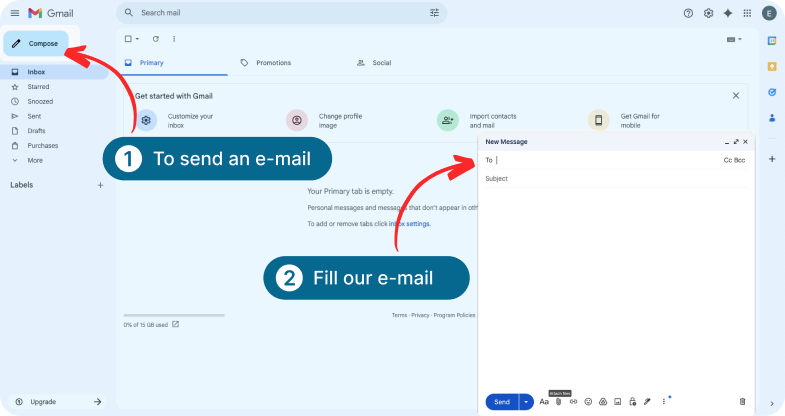
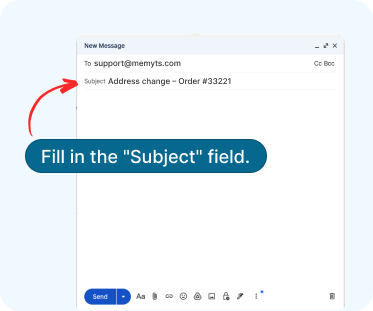
3. Fill in the "Subject"
line correctly
In the subject, always write:
[The type of issue + your order number]
Examples:
- Refund – Order #12345
- Package not received – Order #98765
- Address change – Order #33221
- Billing question – Order #55678
This helps us find your order faster.
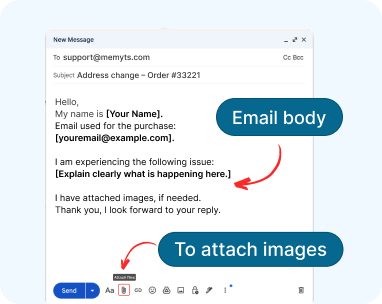
4. In the body of the
email, please include:
Write clearly and include the following information:
- Your full name
- The email used for the purchase
- A detailed description of the problem
- Photos or screenshots (if possible)
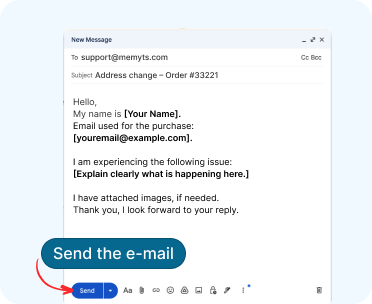
5. Send the email
After filling everything out, click Send.
Our team will reply as soon as possible!
Important tip
Please, be aware the more information you include in your first email, the faster we can solve your request.